
Antigravity Panel
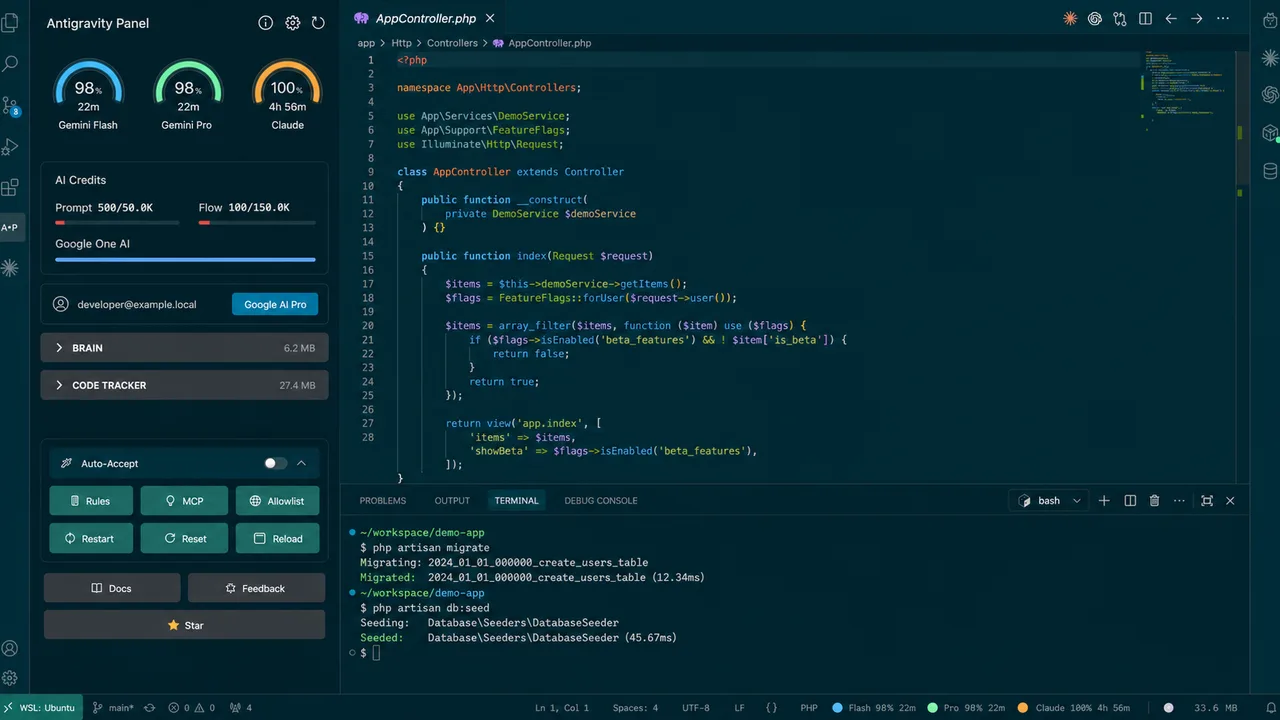
Monitor quotas, cache, and cloud resources for Google Antigravity IDE. A focused operations panel for AI development environments. Formerly published as Toolkit for Antigravity.
Google Antigravity IDE users who need quota visibility, cache management, diagnostics, and local controls.
Overview
- Sidebar toolkit for Google Antigravity IDE. Formerly published as Toolkit for Antigravity.
- Tracks Gemini, Claude, and GPT usage where the local environment provides it.
- Includes cache management, diagnostics, hands-free mode, commit-message generation, and service recovery tools.
Common Uses
- Monitor model quota and usage trends during long coding sessions.
- Clean or inspect conversation cache when the IDE becomes sluggish.
- Restart local Antigravity services or run diagnostics before assuming project code is broken.
Requirements
- Google Antigravity IDE
- Node.js v22+ recommended for development
- Optional Anthropic API key for Claude commit-message generation.
- Optional local LLM for local commit-message generation.
Install
- 1
Install from Open VSX by searching for Antigravity Panel.
- 2
Manual install: download the VSIX from GitHub Releases, open Antigravity Extensions, choose Install from VSIX.
Configure
- 1
Open the Antigravity IDE Extensions panel and search for Antigravity Panel.
- 2
Quota polling interval defaults to 90s, minimum 60s.
- 3
Cache check interval defaults to 120s, valid range 30-600s.
- 4
CDP fallback requires launching Antigravity with --remote-debugging-port=9222.
- 5
Run Antigravity Panel: Set Anthropic API Key before using Claude commit generation.
Tools / Commands
- Antigravity Panel: Open Panel
- Antigravity Panel: Refresh Quota
- Antigravity Panel: Show Cache Size
- Antigravity Panel: Clean Cache
- Antigravity Panel: Open Settings
- Antigravity Panel: Show Disclaimer
- Antigravity Panel: Restart Language Server
- Antigravity Panel: Reset User Status
- Antigravity Panel: Run Diagnostics
- Antigravity Panel: Reload Window
- Antigravity Panel: Toggle Auto-Accept
- Antigravity Panel: Generate Commit Message
- Antigravity Panel: Set Anthropic API Key
Resources / Settings
- Quota dashboard with threshold visualization.
- Usage analytics with history and consumption speed.
- Conversation cache management.
- Quick access to Rules, MCP, Allowlist, and related configuration.
- Runtime localization across 13 languages.
FAQ
Frequently asked questions and troubleshooting guides.